It is 11:58 p.m. on the night before Black Friday. One person is ready to publish the sale theme, another is activating discount codes, and someone else is checking that the homepage banner matches the offer. At 12:03 a.m., the banner says 30% off but the discount is not live yet, and the first support tickets arrive.
That scramble is avoidable. Shopify’s rollouts let you schedule theme, discount, and catalog changes to go live together and roll back automatically when the sale ends. This guide shows how to run a BFCM sale without manually changing your store at midnight. If you are still planning offers, you can set up your BFCM store on Shopify and use this as your launch plan.
For reference, Black Friday falls on November 27, 2026, and Cyber Monday on November 30, 2026.
What Shopify Rollouts Are
Rollouts are Shopify’s tool for scheduling and testing store changes as one coordinated release.
What a rollout can include
Shopify’s Help Center says rollouts can include changes to your main theme, checkout and accounts pages, discounts, product catalogs, or a combination (Source: Shopify Help Center).
Three rollout types
Shopify describes three types. A launch merges changes into your store permanently. An event publishes changes for a set period and then rolls them back. An experiment compares a treatment against a control before a full launch.
Built for campaigns like BFCM
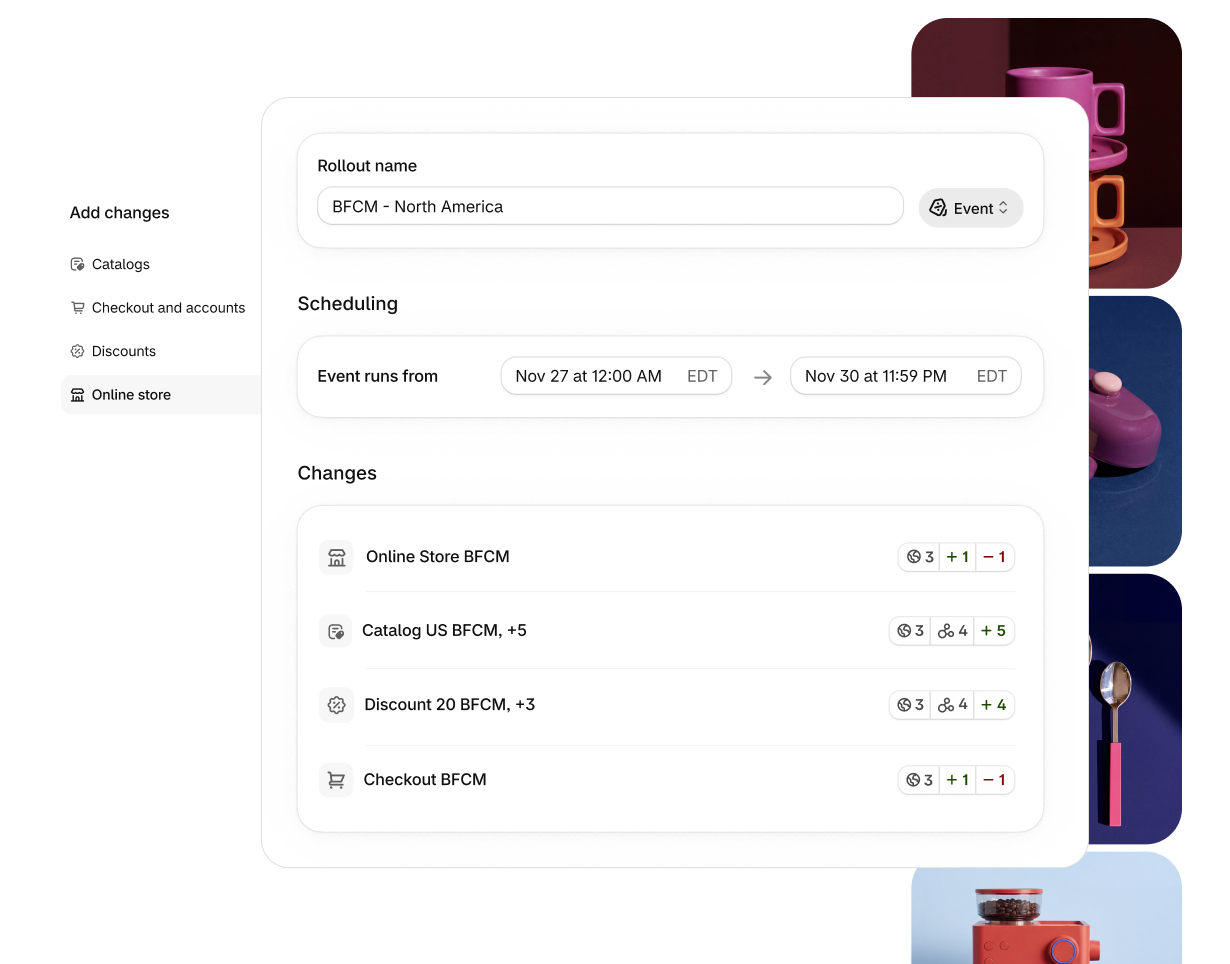
In its Fall ’26 Edition, Shopify highlighted a clearer rollouts setup that bundles theme, checkout configuration, catalogs, and discounts into one rollout, using Black Friday as an example (Source: Shopify Editions Fall ’26).
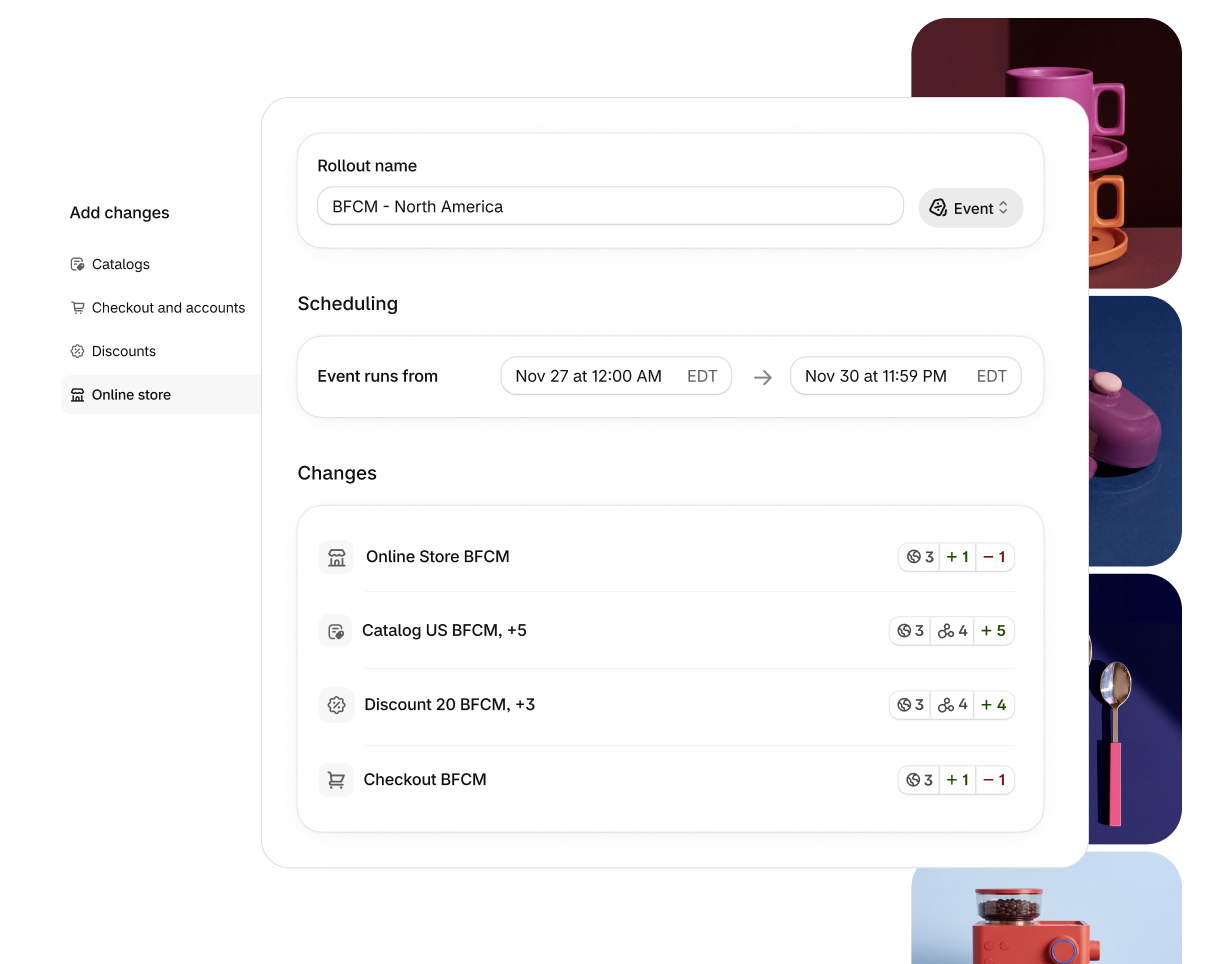
Image source: Shopify Editions Fall ’26.
Why Manual Midnight Launches Go Wrong
Manual launches rarely fail because of one big mistake. They fail because several small steps happen at slightly different times.
Mismatched timing
The banner goes live before the discount, or the discount expires before the theme changes back. Shoppers see promises the checkout does not honor.
Forgotten clean-up
After the sale, someone has to remember to remove banners, end discounts, and restore regular pricing. Stale “Black Friday” messaging in December looks careless and can confuse shoppers about current prices.
Tired people making changes
Late-night changes by tired team members are where typos in discount codes and wrong collection links come from.
Plan the BFCM Rollout
A rollout is only as good as the plan behind it.
List every change the sale needs
Write down each change: homepage banner, announcement bar, sale collection, product badges, discount rules, and any checkout messaging. Anything not on the list will be forgotten.
Choose launch or event
Changes that should end when the sale ends, such as sale banners and discounts, fit an event. Changes you want to keep, such as a new navigation layout, fit a launch.
Decide the exact start and end times
Pick times in your store’s time zone and confirm how they map to your main customer regions. A sale starting at midnight Eastern is 9 p.m. Pacific the night before.
| Change | Rollout type | Reason |
|---|---|---|
| Sale banner and announcement bar | Event | Should disappear when the sale ends |
| BFCM discounts | Event | Must start and stop with the banner |
| Sale collection and catalog pricing | Event | Temporary merchandising |
| Improved navigation for gift shopping | Launch | Useful after the sale |
| New hero layout | Experiment, then launch | Test before keeping |
Partnered with Shopify: This guide includes Shopify links for merchants scheduling sales, themes, and discounts for BFCM.
Build and Test Before the Week of the Sale
The goal is to finish all build work days before Black Friday.
Draft theme changes in advance
Shopify notes that you can draft changes on your live theme instead of duplicating it. Build the sale banner, sale collection, and badges without publishing them.
Attach discounts to the same rollout
Include discount changes in the same rollout as the banner so they start and end together. This removes the most common mismatch between what shoppers see and what checkout applies.
Run a test order
Preview the rollout and place a test order with each discount. Check that the discounted price, shipping, and taxes appear correctly at checkout.

Image source: Unsplash.
Use an Experiment Before You Commit
BFCM is not the week to guess whether a new homepage works. Shopify’s experiment rollout type lets you compare a treatment against a control before a full launch.
Test early in November
Run experiments in early or mid-November, when traffic is healthy but stakes are lower. A test on Black Friday itself is distorted by unusual shopper behavior and heavy discounting.
Test one thing at a time
If you change the hero image, navigation, and product grid together, you will not know which change helped. Pick the single change you most want to keep, such as a gift-finder navigation, and test that.
Decide what counts as a win
Choose the measure before the test starts, such as conversion rate or average order value. Without a clear target, it is easy to read any result as positive.
Coordinate the Team Around the Rollout
Scheduling removes manual steps, but people still need to know what is happening.
Share one launch document
List the rollout name, start and end times, discount rules, and the person responsible for each part. Support, marketing, and fulfillment should all read the same document.
Align emails and ads with the schedule
Marketing emails and ads should not go out before the rollout starts. If an email lands at 11 p.m. but the sale starts at midnight, shoppers click into a store without the offer.
Prepare support answers
Write short answers for common questions: when the sale ends, whether discounts stack, and holiday delivery cutoffs. Support teams handle peak days far better with prepared replies. You can manage discounts and combinations in Shopify to make stacking rules clear before the sale.
On Launch Day
With a scheduled rollout, launch day becomes a monitoring job, not a building job.
Watch the first hour
Check the storefront and place a real order soon after the start time. Confirm banners, collections, and discounts all match.
Keep a short incident plan
Decide in advance who can pause or change the rollout if something is wrong, and how support should respond to price questions.
Track results against the plan
Shopify’s Help Center notes that you can review rollout analytics after a rollout runs. Compare results against your normal store performance rather than just watching total sales.
After the Sale Ends
Events roll back automatically when their period ends, according to Shopify’s Help Center. That handles the biggest clean-up task, but not every one.
Check that everything rolled back
Visit the homepage, sale collection, and a few product pages after the end time. Make sure no sale messaging remains.
Review leftover discounts
Discount codes shared by affiliates or influencers may circulate after the sale. Confirm they are no longer active if they were meant to end.
Plan the next switch
After Cyber Monday, many stores move straight into Christmas gift messaging. Build that as its own scheduled rollout rather than editing the theme by hand.
Example BFCM Schedule
Here is one way to structure the week for a mid-size store.
- November 16 to 20: Build sale theme changes, discounts, and sale collection as one event.
- November 23: Preview the rollout, place test orders, fix issues.
- November 26: Final check of start time, discount rules, and support scripts.
- November 27: Event starts automatically. Team monitors the first hour.
- November 30: Cyber Monday traffic. Monitor stock and support volume.
- December 1: Event ends and rolls back. Christmas rollout begins.
Adjust the dates to your own offer, then schedule the rollout in Shopify once everything is tested.
Common Mistakes to Avoid
Even with scheduling, a few errors still slip through.
- Leaving discounts outside the rollout, so they start at a different time.
- Forgetting time zone differences between your store and your customers.
- Skipping a test order with each discount.
- Using a launch for temporary changes, so nothing rolls back.
- Making manual theme edits during the sale that conflict with the rollout.
Image source: Unsplash.
Final Thoughts
To run a BFCM sale without manually changing your store at midnight, bundle the theme, discounts, and catalog changes into one scheduled rollout, use an event so everything rolls back on time, and test with real orders before launch day. That turns Black Friday from a late-night build into a monitoring task. Use Shopify rollouts to plan the Christmas switch the same way.
FAQ
Can Shopify rollouts include discounts?
Yes. Shopify’s Help Center says rollouts can include theme, checkout and accounts pages, discounts, and product catalogs.
What is the difference between a launch and an event?
A launch makes changes permanent. An event publishes changes for a set period and then rolls them back automatically.
When is Black Friday in 2026?
Black Friday is November 27, 2026, and Cyber Monday is November 30, 2026.
We only recommend tools we’ve tested and trust. This post may include affiliate links, meaning we may earn a commission if you choose to purchase – at no extra cost to you.