
On December 19, a shopper finds the perfect gift on your store, then scrolls to find out whether it will arrive by Christmas. If the answer is buried on a shipping policy page, they leave. If the page simply says “Too late for Christmas,” they also leave. Either way, the sale is gone.
Clear Christmas shipping deadlines protect you from late-delivery complaints and keep last-minute shoppers buying. This guide shows how to calculate order-by dates, where to show them on Shopify, and what to offer after each cutoff passes. If you are setting up shipping for the season, you can review shipping options on Shopify while you plan.
Ship-By Dates Versus Order-By Dates
Carriers publish ship-by dates. Shoppers need order-by dates. The difference is your processing time.
Start from carrier guidance
For 2026, USPS lists recommended send-by dates for delivery within the contiguous US before December 25: December 17 for USPS Ground Advantage and First-Class Mail, December 18 for Priority Mail, and December 19 for Priority Mail Express (Source: USPS). Other carriers and countries publish their own dates.
Subtract your processing time
If you need two business days to pick, pack, and hand parcels to the carrier, your order-by date is two business days before the carrier’s send-by date.
Add a buffer for peak volume
Peak weeks bring more orders and more carrier strain. A one-day buffer protects you from small delays that turn into missed gifts.

Image source: Unsplash.
Calculate Your Order-By Dates
A simple table keeps everyone on the same dates.
| Service | USPS 2026 send-by (contiguous US) | Example order-by (2-day processing, 1-day buffer) |
|---|---|---|
| Ground Advantage | Thursday, Dec 17 | Monday, Dec 14 |
| Priority Mail | Friday, Dec 18 | Tuesday, Dec 15 |
| Priority Mail Express | Saturday, Dec 19 | Tuesday, Dec 15, or Wednesday, Dec 16 if you hand parcels to the carrier on Saturdays |
The order-by examples are illustrative. They count back three business days from the send-by date: two for processing and one for buffer. Count only the days your team actually works, and adjust for your real processing time and carrier mix.
Handle remote and international destinations
Alaska, Hawaii, military addresses, and international destinations have earlier dates. USPS publishes separate dates for military APO, FPO, and DPO addresses. Show those separately rather than using one national date.
Plan for made-to-order products
Personalized or made-to-order items need production time. Give them their own earlier order-by date, and label those products clearly.
Set Up Shipping Options That Match the Dates
Deadlines only work if shoppers can choose a service that meets them.
Offer an expedited option in December
If you normally offer only standard shipping, add an expedited rate for the holiday period. Shoppers who miss the standard cutoff can still order.
Use clear rate names
“Priority (order by Dec 15 for Christmas)” is more helpful than “Shipping Option 2.” Rate names appear at checkout, where the decision is made.
Set rates by region where needed
Shopify’s Fall ’26 Edition highlights shipping set up within markets, letting merchants configure shipping options for each region (Source: Shopify Editions Fall ’26). Use this to give international markets their own options and messaging.
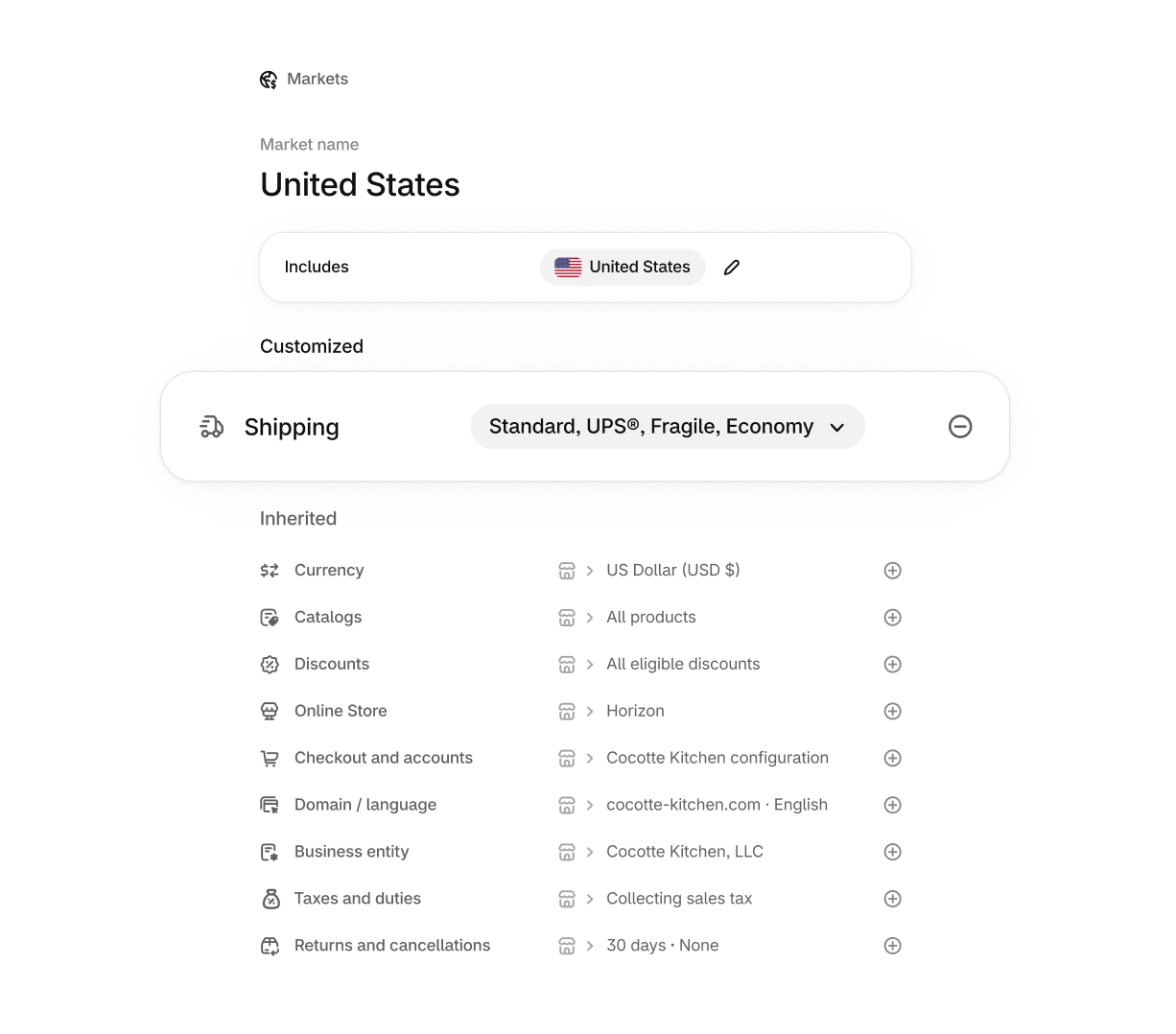
Image source: Shopify Editions Fall ’26.
Partnered with Shopify: This guide includes Shopify links for merchants configuring holiday shipping and delivery messaging.
Where to Show Deadlines on Your Store
Shoppers should see the relevant date before they ask.
Announcement bar
Show the next upcoming cutoff, not all of them. “Order by Dec 14 for standard Christmas delivery” is clear and short. Update it as each date passes.
Product pages
Add a short delivery line near the add-to-cart button. For made-to-order items, show their earlier date.
Cart and checkout
Repeat the date in the cart and use descriptive shipping rate names at checkout, so the last decision point confirms the promise.
What to Offer After Each Cutoff
A passed deadline does not have to end the sale.
Move shoppers to faster shipping
When standard shipping closes, update messaging to point to expedited options that still arrive in time.
Promote digital gift cards
Digital gift cards can be delivered instantly by email. After the final shipping cutoff, they become the main way to keep selling Christmas gifts. Make them visible on the homepage and in the announcement bar.
Offer local pickup if you can
If you have a store or warehouse that can handle pickups, local pickup lets nearby shoppers buy right up to Christmas Eve.
Be honest about late delivery
For shoppers who still want physical items, state the expected delivery after Christmas. Some will buy anyway, especially for New Year gifts.

Image source: Unsplash.
Reduce Delivery Failures in Peak Weeks
Missing a deadline is not the only way a gift arrives late.
Catch address errors at checkout
Gift buyers often type someone else’s address, which increases the chance of missing apartment numbers or wrong postal codes. An address validation app such as Valider can prompt shoppers to check addresses before they complete checkout.
Watch for PO Boxes and unsupported services
Some carriers or services cannot deliver to every address type. Make sure shoppers do not choose a service that cannot reach their destination.
Send tracking promptly
Fast tracking emails reduce “where is my order” tickets, which helps your team focus on shipping during the busiest days.
Worked Example: A Small Candle Studio
A two-person candle studio in Ohio ships most orders by USPS and pours some scents to order.
Their numbers
In-stock candles take two business days to pack in December. Made-to-order scents need four extra days to cure. The studio does not ship on weekends.
Their dates
Counting back from the USPS send-by dates, they set Monday, December 14 for standard Ground Advantage orders and Tuesday, December 15 for Priority Mail. Made-to-order candles get an earlier date, Tuesday, December 8, to allow for curing. Each date appears on the relevant product pages, and the announcement bar always shows the next upcoming cutoff.
Their plan after the cutoffs
From December 16, the homepage leads with digital gift cards and a local pickup option for customers within driving distance. Physical orders still go through, with a clear note that delivery will be after Christmas.
The result is simple: fewer late-delivery complaints, and sales that continue after shipping closes. You can set up digital gift cards in Shopify in advance so they are ready on the day the last cutoff passes.
Deadlines for International Customers
Cross-border gift orders need even more lead time and clearer messaging.
Publish international dates separately
International shipping takes longer and can be held at customs. Use earlier dates for international orders and show them in the relevant markets rather than on your US pages.
Explain duties and taxes up front
A gift that arrives with unexpected import charges is a poor experience for the recipient. If your setup collects duties at checkout, say so. If it does not, warn buyers that recipients may need to pay.
Offer gift cards earlier abroad
Because international cutoffs arrive first, start promoting digital gift cards to international shoppers sooner than to domestic ones.
Plan Customer Emails Around the Dates
Email reminders give shoppers a reason to act before each cutoff.
Send a reminder two to three days before each cutoff
A short email with the date and a link to your gift guide works better than another discount.
Send a final “gift cards still available” email
After the last shipping cutoff, remind subscribers that digital gift cards arrive instantly.
Prepare support replies
Write short answers about cutoff dates, express options, and late delivery so support can reply consistently.
Christmas Shipping Deadline Checklist
Complete these steps by early December.
- Collect carrier send-by dates for every service you use.
- Subtract processing time and a buffer to set order-by dates.
- Set separate dates for made-to-order items and remote destinations.
- Add an expedited shipping rate with a clear name.
- Show the next cutoff in the announcement bar, product pages, and cart.
- Prepare gift card and pickup messaging for after the final cutoff.
- Schedule reminder emails before each date.
Then check your Shopify checkout on mobile to confirm rate names and dates read clearly.
Final Thoughts
To set Christmas shipping deadlines on Shopify without losing last-minute sales, start from carrier send-by dates, subtract your real processing time plus a buffer, and show the next order-by date wherever shoppers decide. After each cutoff, steer shoppers to faster shipping, local pickup, or digital gift cards instead of turning them away. Use Shopify’s shipping settings to keep rates and messaging accurate through December.
FAQ
What are the USPS Christmas 2026 shipping deadlines?
For the contiguous US, USPS recommends December 17 for Ground Advantage, December 18 for Priority Mail, and December 19 for Priority Mail Express.
Should my order-by date match the carrier’s date?
No. Subtract your processing time and add a buffer, so orders reach the carrier before its send-by date.
What can I sell after the last shipping cutoff?
Digital gift cards, local pickup orders, and items for New Year delivery, with honest delivery dates.
We only recommend tools we’ve tested and trust. This post may include affiliate links, meaning we may earn a commission if you choose to purchase – at no extra cost to you.