Picture a shopper building a holiday gift list in the Shop app. They add a candle from one brand, a scarf from another, and a coffee set from a third. Instead of three separate checkouts, they pay once. Your product just sold, but the shopper never visited your storefront.
That is the idea behind Universal Checkout on Shop. Shopify announced it in its Fall ’26 Edition as a way for shoppers to add products from multiple brands to one cart and check out in one tap (Source: Shopify Editions Fall ’26). This article explains what it means for merchants: what you gain, what you control less, and how to prepare. If you are still setting up your catalog for these surfaces, you can get your store ready on Shopify first.
What Universal Checkout Actually Is
Universal Checkout combines carts from several Shopify merchants into one checkout experience for the buyer.
One cart per merchant, one checkout for the buyer
Shopify’s developer documentation describes how an agent or app creates a separate cart for each merchant and then requests a combined checkout for those carts, up to 15 at a time (Source: Shopify.dev).
From the shopper’s side, it feels like a single purchase. Behind the scenes, each merchant’s cart is still tracked on its own.
Shop Pay is the sign-in layer
The same documentation explains that buyers sign in with Shop Pay, and a signed-out buyer sees a Shop sign-in page first. Stored payment and shipping details are what make the “one tap” experience possible.
Not every cart can be combined
Carts need to use the same currency, and carts that cannot be combined fall back to separate checkouts. Each merchant’s checkout can also end in a different state, so one store’s order may complete while another’s does not.
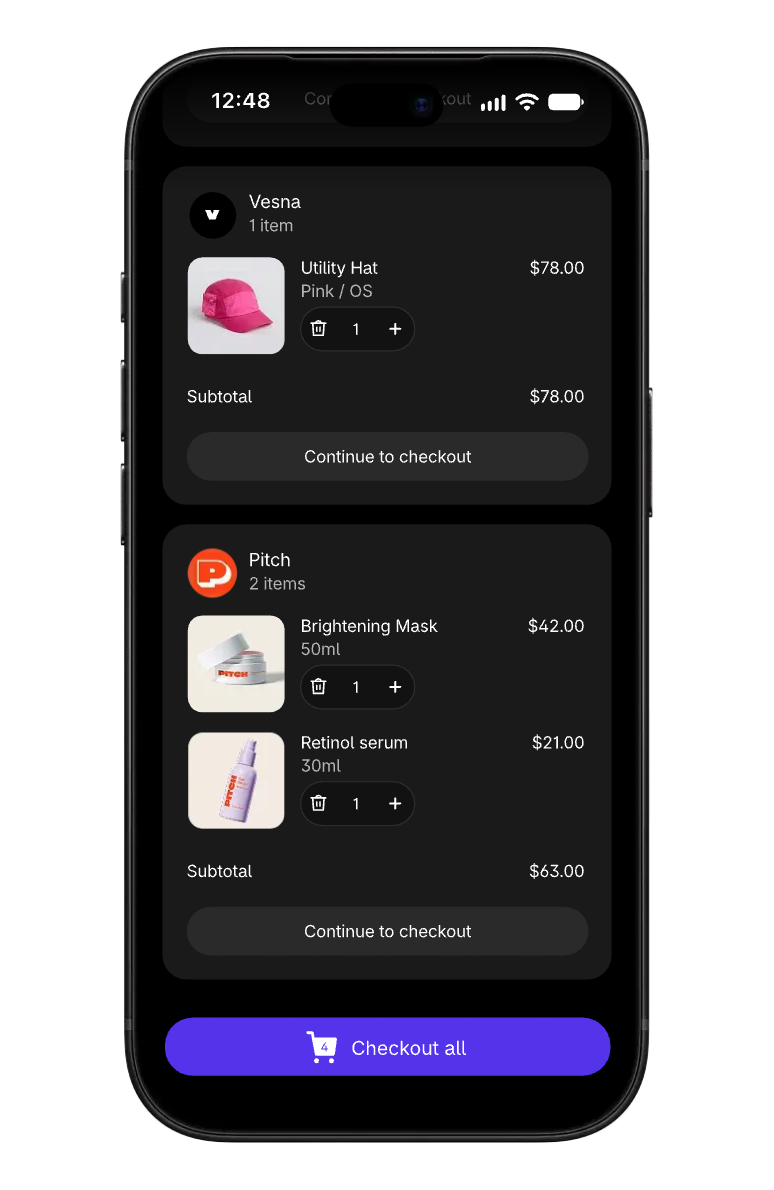
Image source: Shopify Editions Fall ’26.
Where It Applies Today
It is important to separate the shopper-facing announcement from the developer rollout status.
Announced for Shop
Shopify’s Edition page frames Universal Checkout as a Shop experience for multi-brand carts. Shoppers browsing Shop and agent experiences connected to Shopify are the main audience.
Early access for developers
Shopify’s developer documentation marks the agent capability as early access, available by request, and warns that tool names and fields may change before general availability. Treat details as evolving rather than final.
Your own storefront checkout is unchanged
Shoppers who visit your online store still use your normal checkout. Universal Checkout adds another path to purchase, it does not replace the one you already run.
What Merchants Can Gain
For many brands, the main benefit is fewer drop-off points for shoppers who were already interested.
Less friction for multi-brand gift lists
Holiday shoppers often buy several small gifts from different brands. Having to repeat checkout at each store is a natural point to give up. A combined checkout removes that repetition.
Exposure next to complementary brands
If your product pairs well with items from other stores, such as accessories or gift add-ons, multi-brand carts give shoppers a reason to include you in a bigger order.
More value from accurate catalog data
Agents and Shop rely on structured product data. Merchants with clear titles, prices, variants, and availability are easier to add to these carts. Shopify’s Catalog mapping tools let you control which title and description Catalog uses (Source: Shopify Help Center).

Image source: Unsplash.
What Changes for Brand Experience and Control
Selling inside a shared checkout means some parts of the experience are no longer fully yours.
Less room for storefront storytelling
Your homepage, brand story, and product page layout may not be part of the journey. Your product data and images have to do the selling on their own.
Checkout customizations may not travel
Upsells, custom checkout blocks, and branded touches built into your store’s checkout should not be assumed to appear in a combined checkout. Shopify’s developer page does not describe how individual merchant checkout customizations behave there, so plan as if they will not.
Policies still need to be clear
Returns, shipping times, and support contacts still belong to you. If they are vague, a combined checkout makes it harder for shoppers to know whom to contact after delivery.
| Area | Your online store checkout | Universal Checkout on Shop |
|---|---|---|
| Brand presentation | Full control | Mostly product data and images |
| Payment sign-in | Your enabled methods | Shop Pay sign-in |
| Checkout extras | Your customizations | Do not assume they appear |
| Cart contents | Your products only | Products from several merchants |
| Status | Generally available | Developer capability in early access |
Partnered with Shopify: This guide includes Shopify links for merchants preparing catalog data and Shop Pay for newer shopping surfaces.
Which Merchants Are Most Likely to Benefit
Universal Checkout will not matter equally to every store, so it helps to know where your brand sits.
Giftable, lower-priced products
Candles, small accessories, stationery, snacks, and similar items are often added as one of several gifts. These products fit naturally into multi-brand carts, where shoppers combine a few smaller purchases into one order.
Brands that pair with other categories
A ceramic mug brand pairs with coffee roasters. A phone case brand pairs with tech accessories. If your products complete someone else’s purchase, a shared cart creates more chances to be included.
Stores with high checkout drop-off
If your analytics show that many shoppers start checkout but do not finish, saved Shop Pay details can remove some of that friction. Stores with complex custom checkout flows, on the other hand, may see less benefit because those extras are not part of the shared experience.
Brands that depend on storefront storytelling
Premium or concept-led brands that rely on immersive product pages may find a combined checkout less suited to how they sell. For them, the priority is making sure product images and descriptions carry enough of the brand on their own. You can refine product media and descriptions in Shopify to close that gap.
Shipping and Fulfillment Considerations
A multi-brand order still ships from several places, which shapes the shopper’s expectations.
Separate packages, separate timelines
A shopper who pays once may still receive three parcels on three different days. Clear delivery estimates in your product data and shipping settings help avoid “where is my order” tickets.
Shipping costs per merchant
Each merchant’s shipping rules still apply to its own cart. If your free-shipping threshold is high, a single low-priced item in a combined cart may carry a shipping fee that looks large compared with other brands in the same checkout.
Holiday cutoffs
Make sure cutoff dates and processing times are accurate before peak weeks. A missed delivery reflects on your brand even if the purchase began elsewhere.
Attribution and Measurement
New purchase paths complicate how you read your marketing results.
Expect more orders from non-storefront channels
Orders started in Shop or AI experiences can show up under different sales channels in your reports. Review sales by channel weekly during the holidays so the shift does not look like a storefront traffic drop.
Do not over-credit last-click ads
A shopper may see your ad, research in an AI tool, and buy through a combined checkout. Last-click views will miss part of that path, so compare channel trends rather than relying on one attribution view.
Watch new-customer rates
Multi-brand carts can bring first-time customers. Track how many return to buy from you directly in January, which shows whether the channel builds lasting value.
How to Prepare Your Store
You do not need to wait for every detail to be final to get ready.
- Make sure Shop Pay is enabled and tested on your store.
- Review product titles, descriptions, and images for clarity without your storefront around them.
- Check Shopify Catalog mapping for title, description, and list price sources.
- Confirm shipping rates, processing times, and holiday cutoffs.
- Write return and support details that make sense to a shopper who never visited your site.
- Set up a weekly channel report for the holiday period.
Once these basics are in place, review your Shop channel settings in Shopify to see which options are available to your store.

Image source: Unsplash.
Final Thoughts
Universal Checkout on Shop means Shopify merchants can sell inside multi-brand carts where shoppers pay once, with Shop Pay as the sign-in layer. It can reduce friction for gift lists and add exposure next to complementary brands, but it shifts more of the selling to product data and leaves less room for storefront branding. Prepare your catalog, shipping, and policies now, and keep Shop Pay and Catalog data current on Shopify as the feature develops.
FAQ
Does Universal Checkout replace my store’s checkout?
No. Shoppers on your online store still use your normal checkout. Universal Checkout adds a multi-brand purchase path in Shop and connected experiences.
Do shoppers need Shop Pay to use Universal Checkout?
Shopify’s developer documentation says buyers sign in with Shop Pay, and signed-out buyers are asked to sign in first.
Is Universal Checkout available to every app and agent?
Shopify’s developer page describes the agent capability as early access by request, with details that may change before general availability.
We only recommend tools we’ve tested and trust. This post may include affiliate links, meaning we may earn a commission if you choose to purchase – at no extra cost to you.